
Why Do NEXA Vapes Have Different Display Styles? ULTRA II & PIX Explained
WARNING: This product contains nicotine. Nicotine is an addictive chemical. For adults 21+ only.
Written by Shop N Vape Editorial Team | Published October 13, 2026 | Approximately 7-minute read
Remember when a small electronic device needed just one blinking light?
Today, even pocket-sized gadgets can have curved displays, animated graphics, and beautifully integrated screens. Some show information through digital symbols. Others make parts of the device itself visible.
NEXA is an interesting example of this design trend.
Look at two of its recognizable product families: NEXA ULTRA II and NEXA PIX.
Both belong to the same manufacturer, yet their exterior shapes, screen presentations, and proportions are different.
Understanding the NEXA vape display isn't simply about reading numbers on a screen. It's also about the way industrial designers combine digital information with physical product design.
So why did NEXA give these devices different appearances?
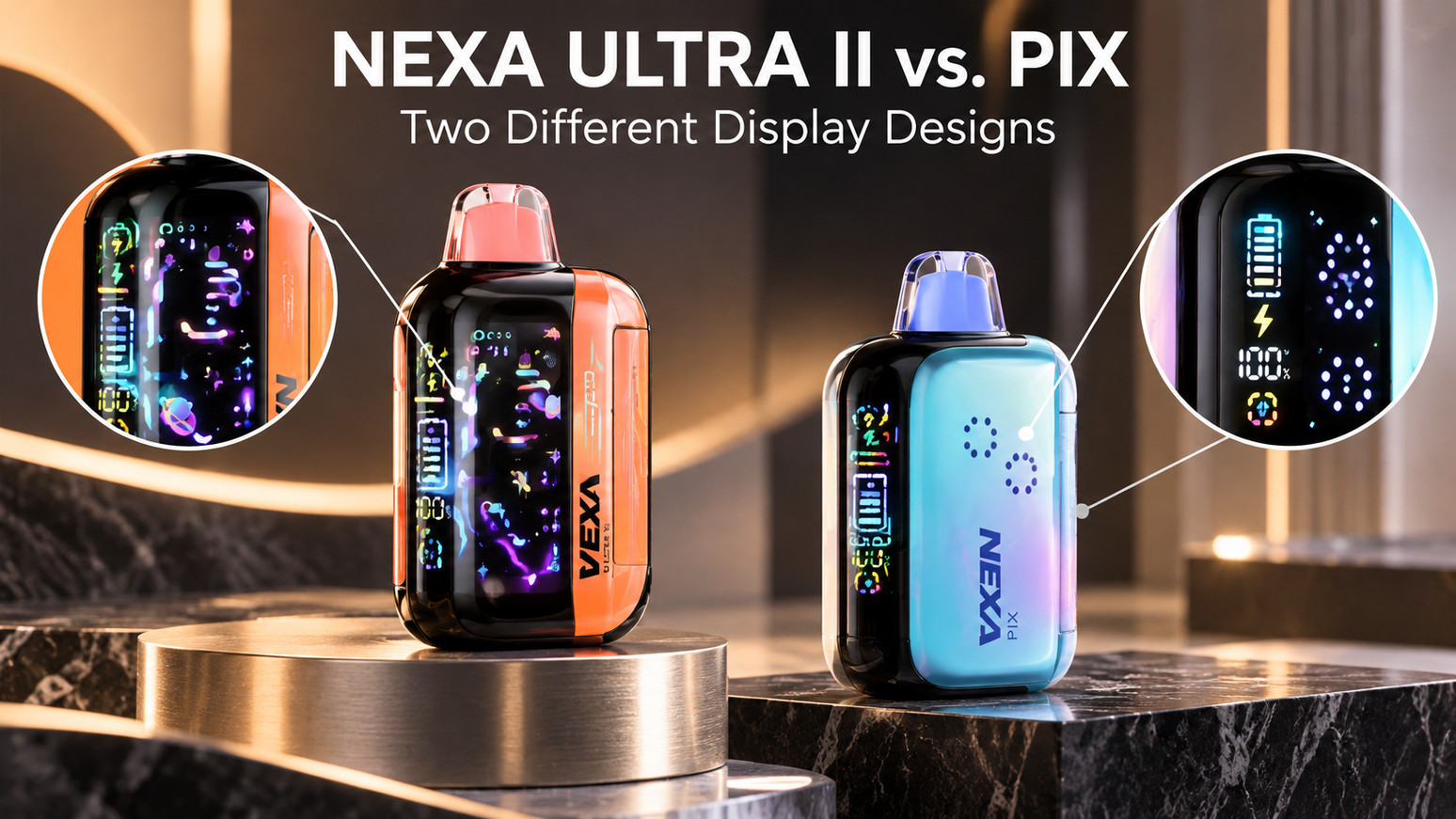
Quick Answer: NEXA ULTRA II and NEXA PIX use different display layouts because they have distinct body designs and screen arrangements. ULTRA II features a prominent curved digital screen, while PIX uses a compact display integrated into a smaller housing. Both also incorporate transparent reservoir sections that provide a direct view of contained e-liquid. The visible design differences should not be confused with proof of superior performance.
From One Blinking Light to a Digital Display
Years ago, many small electronic products used basic indicator lights.
A light might show that a battery was charging or that a device had been activated.
It was a straightforward design approach.
But as compact displays became more common, manufacturers began using screens to present several kinds of information in one place.
This change happened in watches, headphones, cameras, portable battery packs, and numerous other consumer products.
Electronic nicotine devices also adopted digital interfaces.
The result is a category in which exterior design can vary considerably between manufacturers—and even between products made by the same brand.
NEXA's recent device families illustrate that variety.
Why NEXA ULTRA II Has Such a Noticeable Screen
One of the distinguishing features of NEXA ULTRA II is its 3D curved digital display.
Rather than appearing as a tiny indicator window, the display occupies a visually prominent part of the housing.
The curvature influences how the device looks from different angles.
Seen from the front, the screen becomes a central element of the product's appearance.
Viewed from the side, its relationship to the curved body becomes more noticeable.
The display is also designed to present battery and operating-mode information.
But the visual importance goes beyond those readings.
A curved screen can make a compact electronic product look more sculptural than one using a small flat indicator.
This is a familiar idea in modern industrial design.
The screen isn't merely placed inside the product. Its shape becomes part of the product's exterior identity.
What Makes the NEXA PIX Display Different?
Now consider NEXA PIX.
It uses a more compact body design, with a display integrated into a smaller exterior arrangement.
The different proportions change the overall impression of the device.
Instead of the broad curved-screen presentation associated with ULTRA II, PIX incorporates its electronic interface into a narrower, more compact visual package.
The result is a different silhouette.
That doesn't mean one display is universally more useful than the other.
It means the manufacturer made different choices about the relationship between screen placement, housing shape, and product dimensions.
Those choices are part of what gives the two NEXA families their distinct visual identities.
The Surprising Part: Not All Information Is Digital
Here's where NEXA's design becomes more interesting.
Both ULTRA II and PIX incorporate transparent reservoir sections.
That means some information about the device is visible through its physical construction rather than exclusively through a screen.
Think about an ordinary transparent water bottle.
You don't need a digital sensor to see that the liquid level has changed.
The container itself communicates that information.
The same visual principle applies to a transparent reservoir.
You can observe the visible liquid level without relying entirely on an electronic indicator.
This doesn't turn the reservoir into a precision measuring instrument. The visible section may not represent every part of the liquid-delivery system.
But it does show how manufacturers can combine two very different kinds of information display.
One is electronic.
The other is physical.
A Screen and a Transparent Tank Have Different Jobs
At first glance, a digital screen and a clear reservoir might seem like two versions of the same feature.
They're not.
A digital display presents electronic information.
Depending on the device, that might include battery status, operating modes, and other indicators.
A transparent reservoir provides a direct visual view of part of the liquid-containing assembly.
The screen depends on electronic sensing and the manufacturer's interface design.
The reservoir depends on a physical window or transparent material.
Neither method should be assumed to provide perfect measurement.
A battery indicator is an estimate or representation of battery status, and a visible reservoir doesn't necessarily reveal liquid held elsewhere within an assembly.
Understanding those limitations is more useful than treating every indicator as an exact gauge.
Why Use Two Ways of Showing Information?
Many everyday devices combine digital and physical indicators.
A car may show fuel information on a dashboard while also providing physical access to its tank.
A coffee machine might use a digital interface and a visible water reservoir.
A printer can display ink information electronically while allowing certain cartridges to be inspected.
In each case, the two methods provide different kinds of feedback.
NEXA's approach reflects a similar design idea.
A screen presents selected electronic information, while a transparent section makes part of the physical product visible.
That combination creates an appearance different from devices that hide their internal liquid containers entirely.
ULTRA II and PIX: The Visual Differences at a Glance
| Design element | NEXA ULTRA II | NEXA PIX |
|---|---|---|
| Overall appearance | More prominent screen-focused body | Compact, integrated design |
| Digital display | Curved, visually prominent screen | Smaller display integrated into its housing |
| Liquid visibility | Transparent reservoir section | Transparent reservoir section |
| Visual emphasis | Screen curvature and body styling | Compact proportions and integrated elements |
| Brand identity | ULTRA family | PIX family |
This is a comparison of exterior design, not a ranking of device quality or a complete specifications table.
For anyone interested in seeing the manufacturer's different device families together, Shop N Vape maintains a dedicated NEXA product collection.
Why Two Products From the Same Brand Can Look So Different
A manufacturer doesn't have to use one body shape across its entire catalog.
Think about smartphones.
One company may make a compact model and a larger version, each with different screen proportions and external styling.
The products can share a recognizable brand identity without having identical hardware.
NEXA follows the same broad principle of product differentiation.
ULTRA II and PIX belong to the same manufacturer, but they're different designs.
A customer seeing both names in a catalog shouldn't assume that PIX is simply an ULTRA II with a new label, or vice versa.
The complete model name matters.
The manufacturer's official ULTRA II, FLEX and PIX overview provides additional information about the distinct product families.
Why Curved Screens Became Part of Gadget Culture
Curved displays have appeared in many kinds of consumer electronics.
They're used in some smartphones, watches, automotive interfaces, and other digital devices.
From a visual-design perspective, curved surfaces can change how an object catches light and how its display relates to the surrounding housing.
A screen can appear to wrap into the shape of the product instead of sitting like a separate rectangular panel.
That doesn't make curvature an automatic technical advantage.
It is simply one design choice among many.
NEXA ULTRA II offers an example of that aesthetic in a compact electronic nicotine device.
Why PIX Takes a More Compact Approach
Not every product needs a large display to establish its identity.
Some designs emphasize smaller proportions and an integrated appearance.
The screen remains visible, but it doesn't necessarily dominate the entire body.
In compact electronics, designers often have to balance several physical requirements.
These can include the space occupied by the battery, internal components, exterior housing, and display.
The resulting product may look quite different from a larger model produced by the same company.
NEXA PIX provides a useful example of how a manufacturer can present digital information within a comparatively compact design.
Are Display Graphics Always Exact Measurements?
Not necessarily.
Digital indicators are useful representations of information, but they shouldn't automatically be understood as laboratory instruments.
A battery icon might display an approximate charge level.
An operating-mode symbol may identify a selected device setting.
A liquid-level graphic, where present, depends on the particular sensing or calculation method used by the manufacturer.
That's different from physically viewing liquid through a transparent section.
Even a clear reservoir has limitations: visible liquid is not necessarily a precise measure of everything remaining in the device.
A manufacturer's instructions remain the most appropriate source for interpreting the indicators on a particular model.
Why Product Photographs Matter for NEXA Devices
The ULTRA II and PIX provide a good example of why accurate product photography matters.
A photograph taken from the front may emphasize a screen.
A photograph from the side may reveal the curvature of the housing.
Another angle can show the transparent section and how it fits into the overall design.
When a manufacturer has several similarly named product families, the right image makes it easier to identify the device being discussed.
A generic photograph of an unrelated NEXA model cannot reliably represent another product's screen shape.
That matters when reading older blog articles or browsing an online vape shop where several product generations may appear together.
The image, full model name, and manufacturer's specifications should refer to the same product.
Why NEXA's Design Story Is Bigger Than One Screen
The NEXA lineup demonstrates something interesting about modern small electronics.
The exterior no longer has to hide every functional component.
A curved digital display can become a prominent design feature.
A clear reservoir can reveal part of the product's construction.
And different models can combine those elements in different proportions.
These are design decisions that can make closely related products look surprisingly different.
The same general idea appears throughout consumer electronics, where screens, transparent materials, and visible components are increasingly used to establish product identity.
Frequently Asked Questions
Do NEXA ULTRA II and PIX have the same display?
No. Their displays are integrated into different device bodies and have different visual arrangements.
Does NEXA ULTRA II have a curved screen?
Yes. ULTRA II is described with a 3D curved display.
Does NEXA PIX also have a digital display?
Yes. PIX uses a digital display integrated into its compact housing.
Why do both NEXA models have clear reservoir sections?
Transparent sections allow part of the liquid-containing assembly to remain visible instead of being entirely concealed by opaque housing.
Does the transparent reservoir replace the digital screen?
No. The two features communicate different types of information.
Is a curved screen automatically more accurate?
No. The shape of a display does not independently establish the accuracy of its indicators.
Can a product photo tell you exactly how a display works?
Not always. Photographs show the visible design, while the manufacturer provides the relevant operating instructions.
Does PIX use the same parts as ULTRA II?
Compatibility should not be assumed. They are separate product families, and specific components should be identified through manufacturer documentation.
Two Displays, One Interesting Design Story
At first, NEXA ULTRA II and PIX may simply look like two products from the same brand.
But their different screen layouts reveal a more interesting part of modern device design.
ULTRA II makes a curved digital screen a prominent visual feature.
PIX integrates its display into a more compact body.
Both also demonstrate how a transparent reservoir can communicate information without relying entirely on electronic graphics.
It's a reminder that product design involves more than adding new features.
Sometimes the most interesting change is how familiar features are arranged, presented, and made visible.
Shop N Vape Editorial Team
Published by Shop N Vape, providing educational information about electronic-device design, manufacturer product families, and consumer technology for adults aged 21 and older.
Explore Popular Articles
Why Do NEXA Vapes Have Different Display Styles? ULTRA II & PIX Explained
WARNING: This product contains nicotine. Nicotine is an addictive chemical. For adults 21+ only. Wri...

Why Do RAZ Vapes Look Like Mini Smartphones?
WARNING: This product contains nicotine. Nicotine is an addictive chemical. For adults 21+ only. Wri...

Ordered a Geek Bar? What Processing, Shipped & Delivered Really Mean
WARNING: This product contains nicotine. Nicotine is an addictive chemical. For adults 21+ only. Wri...

What Makes a Good Online Disposable Vape Shop?
WARNING: This product contains nicotine. Nicotine is an addictive chemical. For adults 21+ only. Wri...